What is a VPN?
VPN routes your traffic through an encrypted tunnel to a remote server, masking your IP and securing your data.
In simple terms, a VPN encrypts data between your device and the VPN server—a model used across the industry and built into many mainstream operating systems. Its security and practicality are widely accepted after years of real-world use.
Encrypted Protection
Data scrambled, impossible to steal

Hidden Identity
IP address concealed

Global Access
By pass regional restrictions
With a VPN, You Can...
VPN routes your traffic through an encrypted tunnel to a remote server, masking your IP and securing your data.
Secure Access
Use the Internet Securely from Anywhere.
Hides your IP address and encrypts your network data so no one can see what you’re doing. One click, and you’re protected.

Global Content
Access Your Favorite Content & APP.
Defeat censorship and restrictions. Stream your favorite shows, music, and sports securely, even on public Wi-Fi, without bandwidth throttling. Unblock Instagram, WhatsApp, Netflix, and your daily essentials anywhere.
Better Discount
Get Better Discount Across Regions
Access cross-region deals and save more on your purchases.

Censorship & Locked-Down Wi‑Fi
Use global apps in China and on restrictive networks
In countries with heavy blocking (such as China), a VPN helps you reach mainstream international apps and websites—whether you live and work there long-term or are only visiting. It’s also how you regain sensible access on corporate or school networks when administrators enforce policies that get in your way.
Access all Streaming platforms
Stream Your Favorites Anywhere
Don't let borders stop you. Use our VPN to access the streaming subscriptions you already own while traveling abroad.

*5UFVPN does not provide streaming accounts. You need your own subscription.
How 5UF VPN Shields Your Digital Life

Mask Your IP We hide your digital fingerprint. Advertisers and hackers can no longer trace your physical location.

Encrypt Everything With AES-256 encryption, your data becomes unreadable gibberish to ISPs and prying eyes.
Bypass Censorship Break through firewalls and access the open web freely, anywhere in the world.
Why Choose Us
Not just a wall-by-wall tool, it's your all-in-one web assistant. Unlock the Full Potential of the Internet

True Unlimited Data
Fair usage, no hidden limits. Transparent rules with manual reset available when quota exceeded.

Global Servers
Global servers across continents. One-click connection. Switch routes instantly.

Block Ads & Adult Content
Built-in ad blocking with multiple strategies for efficient filtering.

Custom Routing Rules
Route by country or domain: bypass the VPN for local sites so domestic apps stay fast, while foreign traffic is accelerated. Ideal for heavy censorship (e.g. China, Iran). Unique to us—choose which countries or domains to include or exclude.

Full platform, multiple modes
Support iOS, Android, Windows, macOS, Linux systems, web proxy mode. Quick connection in any environment

No-Log Policy
We never log your browsing history, traffic data, or DNS queries. Your privacy stays yours.
Open-Source & Third-Party Clients
We support widely used open-source VPN apps and standard protocols—security and implementations can be reviewed in public by experts worldwide, and you can keep connecting with the third-party clients you already trust. We welcome professional audits of our security approach: traffic and sensitive information are encrypted end-to-end by design; we never hold keys that would let us read your data, so not even we can decrypt your traffic or payloads.
Reliable in China
Most big international VPN brands struggle in China. We started in China and know its networks—dedicated lines for China, not just “it works” but smooth HD streaming at peak hours. Hard for offshore rivals to match.
Singapore company · 16 years · Invoices
Singapore-registered company; formal tax invoices available. 16 years in business—stable and trustworthy. We offer plans up to 10 years; many long-term subscribers have already made the first decade pay for itself.
News
Application Updates & Activity Announcements View more
2026-10-12
Privacy Policy Update: Connection IP Addresses Will Be Logged Starting Today
2026-10-01
Mainland China Regional Dedicated Line Servers Launched on China National Day
2026-08-16
New jp4 Server Live: Direct to Tokyo, Optimized for Mainland China
Learn more about 5UF VPN
Exclusive Cross-Border Dedicated Line Service: Enterprises Can Manage Accounts Themselves and View Exclusive Lines in the APP
We have launched a new service for users or enterprises with particularly high network requirements, providing exclusive cross-border dedicated line service. For details, please visit the following website. If you have any needs, please contact our customer service.
https://feb.sg/zh/china-hk-line/
In addition to providing traditional dedicated line services, we also provide a special line service in the APP. In other words, once your enterprise purchases our dedicated line service, you can get a certain number of free worry-free service accounts from us.
All your enterprise user accounts are managed by you yourself. At the same time, your enterprise users can see the exclusive servers you purchased; these servers can only be seen by your enterprise, and other users cannot see them.
Therefore, this is a deep aggregation service. You do not need technical capabilities on your side; as long as you purchase the relevant dedicated line service, you can see your exclusive lines in our desktop and mobile APP.
5UF HLS Download — Free Chrome Extension for Large HLS Saves
Heads-up: this extension is not tied to 5UF VPN plans or tunneling. Anyone may install and use it at no charge, with or without a VPN subscription.
Many HLS grabbers struggle with large or long-running assets — huge segment counts, merge timeouts, RAM spikes, or fragile resumes. 5UF HLS Download targets those real-world pain points so big HLS jobs are far less likely to stall halfway through.
Get it on the Chrome Web Store:
Chrome Web Store — 5UF HLS Download
Please use responsibly: download only content you are allowed to keep, and respect site terms plus local law. If the listing looks stale, check for updates atchrome://extensionsor restart Chrome.
We will keep polishing reliability; feedback is welcome via our support tickets — include the extension name and your Chrome version.
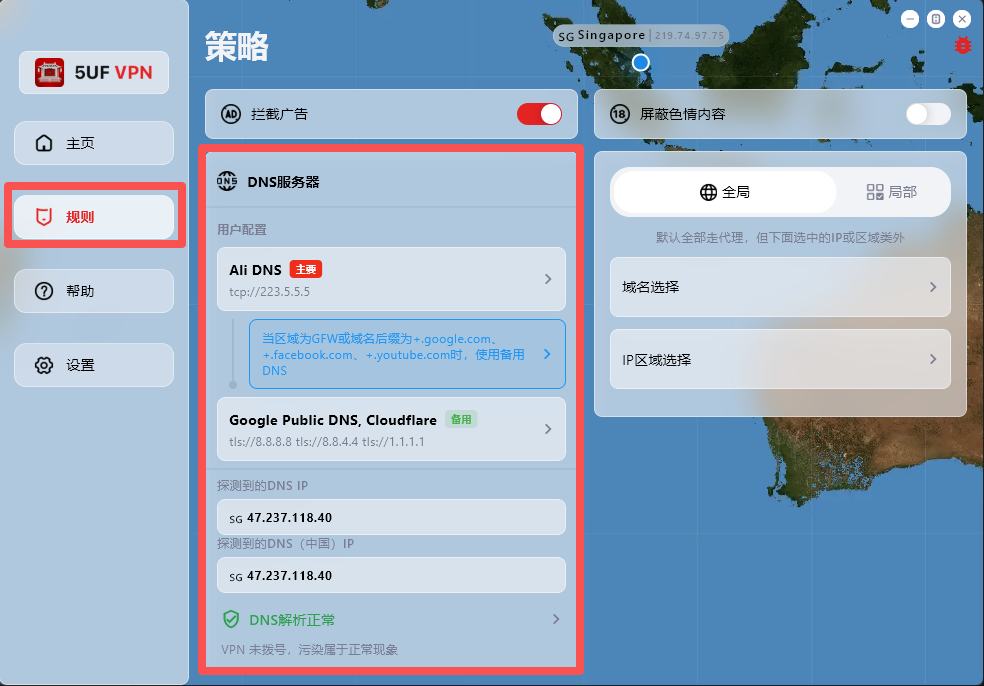
How can I change DNS to reduce DNS pollution issues?
If your network access behaves abnormally, first check and adjust DNS settings in the Rules page.
The app has built-in support for:
1. Changing DNS settings after dial-up/connection.
2. DNS connectivity checks.
3. DNS pollution detection.
Where to configure: open the app main screen, go to Rules, then modify the default DNS request settings.
One-tap preset recovery: at the bottom of the Rules page, we provide built-in presets for common regions, including Mainland China, Hong Kong/Macau, and default profiles for countries/regions such as Iran and Russia.
Dynamic IP database update: the Rules page also includes dynamic IP database update, which you can run when needed.
Why detected DNS may differ from configured DNS:
DNS probing uses temporary domain resolution to identify the actual egress resolver IP within a DNS cluster, so the detected result may not be exactly the DNS address you entered.
For example, even if you configure Google Public DNS (8.8.8.8), the detected resolver may be another cluster node responding to your request.
How do I delete my account?
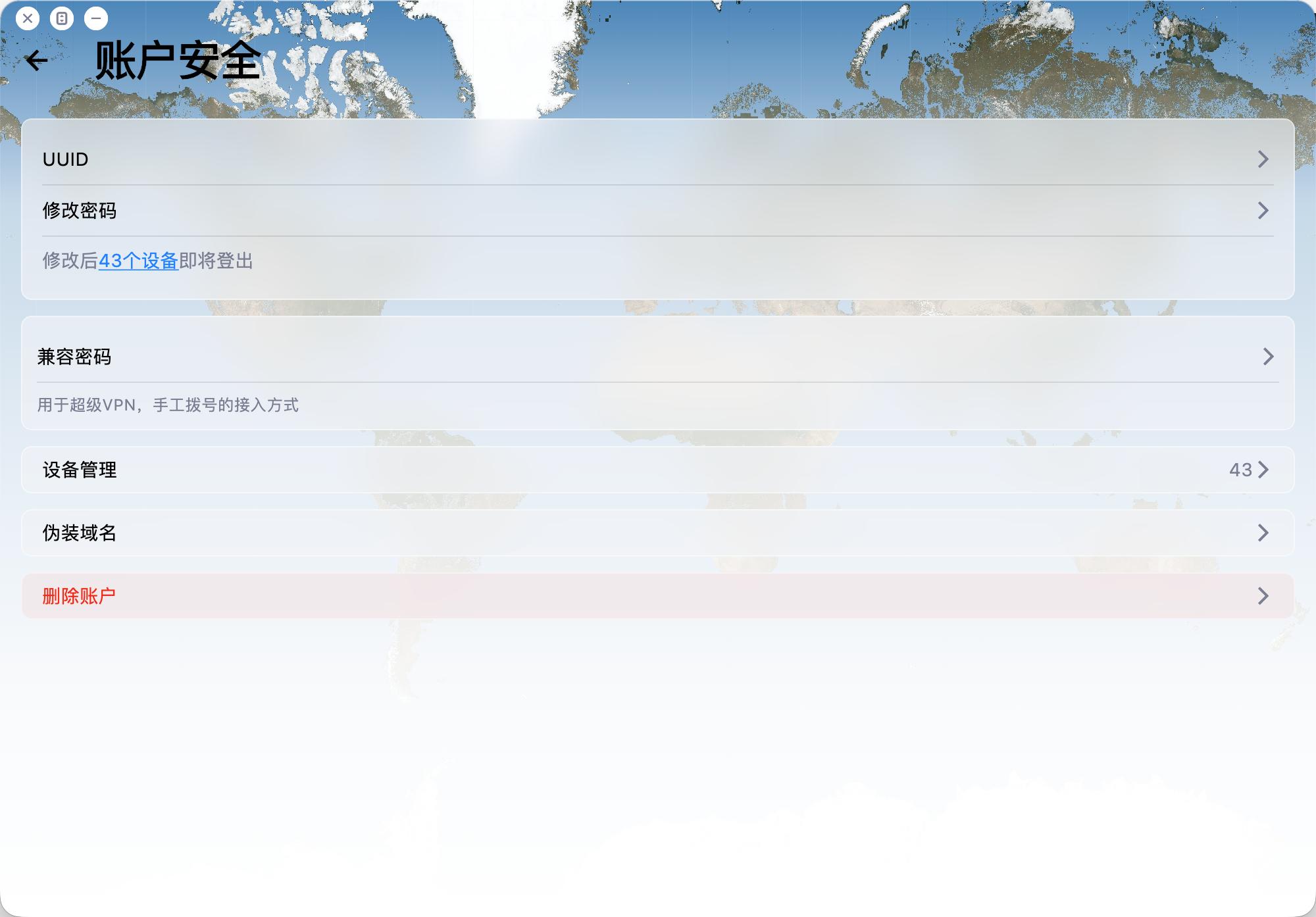
To delete your account:
Open the app and go to Account -> Security -> Delete Account.
Please note:
1. Account deletion is permanent and cannot be undone.
2. Email verification is required before deletion.
3. After deletion, related payment records, usage records, and other associated data will be removed.
4. The account will be deleted regardless of whether you are a VIP member.
How do I collect logs and report issues to you quickly?
When you hit connection issues, unstable speed, or anything hard to reproduce, rich diagnostics help us troubleshoot much faster.
Recommended (best): use the in-app ticket / feedback flow. In recent builds you can attach profiles, network diagnostics, speed-test results, and detailed logs right inside the ticket so support can triage quickly.
Can't find the ticket entry? Open Help → About (or the equivalent section in your client) — you'll usually find shortcuts to logs and network diagnostics there; export or capture what you can, then reach out through whichever channel you prefer.
Tips: try to reproduce once before sending, note time, network type (cellular vs Wi‑Fi, rough region), and your app version; it speeds things up.




Copyright 2008-2026 © 5UF PTE. LTD. All rights reserved.